Designing Products for Enterprise Adoption: What Enterprise SaaS Readiness Requires
Selling to enterprises isn’t just a sales challenge – it’s a product challenge.
Your sales team can build the perfect pitch deck. Your champion inside the account can love the product. None of that matters the moment a security questionnaire lands in your inbox. Or when an IT admin asks how to provision three hundred users without a spreadsheet.
That’s the gap most SaaS teams don’t see coming. The product that won your first hundred customers was never built for a buying committee. It wasn’t built for a procurement process or an internal security team either. Designing products for enterprise adoption means rethinking what “done” looks like. It’s not a few checkboxes added before your next big deal.
This article covers what enterprise buyers actually expect. It covers the security and governance features that gate a deal before sales gets a chance. And it covers how to design onboarding and support that hold up once a real enterprise account signs.
Why Enterprise Adoption Is a Product Problem First
Quick answer:
Enterprise adoption succeeds or fails based on product decisions made long before a deal reaches procurement. Security architecture, admin controls, and onboarding flows can’t be retrofitted in a sprint once a big logo shows up. Treating enterprise readiness as a sales problem is the most common reason upmarket deals stall.
Most product teams treat the SMB-to-enterprise shift as a go-to-market decision. Hire an enterprise AE. Build a pricing tier. Write a case study. The product itself barely changes.
Then a real enterprise prospect shows up, and the gaps surface fast. No single sign-on. No audit log. No way to separate one customer’s data and permissions from another’s inside a shared environment. Sales scrambles. Engineering gets pulled off the roadmap. The deal slips a quarter, or dies quietly in security review.
This is why designing products for enterprise adoption has to start earlier than most teams expect. If you’ve already read our guide on scalability, think of this as the next layer. Scalability asks whether the system can handle the load. Enterprise readiness asks something different. It asks whether the product satisfies what a large organization requires before it trusts you with its data.
What “Enterprise-Ready” Actually Means
Quick answer:
Enterprise-ready means your product meets a buyer’s security, administration, and compliance bar, not just its feature list. It’s a specific set of capabilities: authentication tied to the buyer’s identity provider, granular permissions, audit trails, and admin tools that let IT manage your product the way it manages everything else in its stack.
SMB buyers evaluate a product mostly on what it does. Enterprise buyers evaluate it on what it does. They also weigh who can see it, who can change it, and whether IT can prove that to an auditor. That’s a different bar. It shows up across the whole product, not just a settings page.
| SMB expectations | Enterprise expectations |
|---|---|
| Self-serve signup with email and password | Login through the company’s identity provider (SSO) |
| One admin, loosely defined permissions | Role-based access control, mapped to org structure |
| “Contact support” as the escalation path | Named account team, defined SLAs, escalation tiers |
| Individual users manage their own accounts | Centralized user provisioning and deprovisioning (SCIM) |
| Feature adoption tracked informally | Usage reporting and audit logs available to admins |
Neither list is wrong for its buyer. The mistake is assuming the SMB version can be patched into the enterprise version later. Most of these capabilities touch the data model and permission architecture. Retrofitting them costs far more than designing for them early.

Security, Governance, and Administration: The Non-Negotiables
Quick answer:
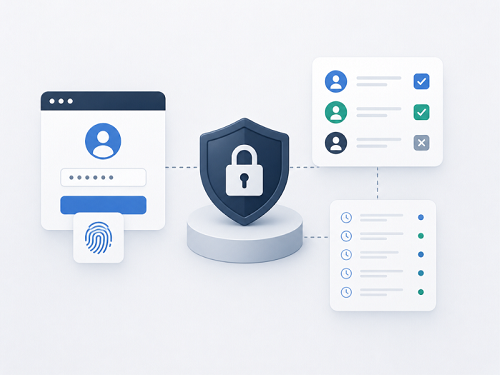
Enterprise buyers treat a specific set of features as non-negotiable before signing: single sign-on, role-based permissions, audit logging, and centralized user management. These aren’t premium add-ons buyers might want. For most enterprise deals, they’re the gate a product has to pass before anyone discusses price.
A 2025 SaaS security benchmark, cited in Clerk’s guide to enterprise SSO, found something telling. Most enterprise RFPs now require both MFA and SSO in the base plan. Not as a paid add-on. A large share of buyers have disqualified vendors outright for failing to prove support for it. The same research found that most enterprises require formal security sign-off before any software purchase can proceed.Single sign-on alone has become the line between an SMB tool and a product enterprise IT will approve. A breakdown of B2B SaaS enterprise readiness by WorkOS puts it plainly. These features are table stakes for a different game. Get them right, and it unlocks contracts an order of magnitude larger, with lower churn
The features that consistently gate enterprise deals:
- Single sign-on (SAML and OIDC). Buyers expect their identity provider – Okta, Microsoft Entra, Google Workspace – to control who logs in, not your password database.
- Role-based access control. Permissions need to map to how the buyer’s organization is structured, not a flat “admin or member” toggle.
- Audit logs. Every meaningful action needs a record: who changed what, and when. It needs to be exportable for a compliance review.
- SCIM provisioning. When someone joins or leaves the buyer’s company, their access should update automatically. Not through a support ticket.
- Data residency and isolation. Larger buyers, especially in finance and healthcare, ask where data lives and how it’s separated from other customers’.
Organizations in regulated sectors add another layer on top of this. If your buyers include banks or insurers, there is another layer on top. Our guide to EU and US banking compliance requirements covers what FINMA, GDPR, and related frameworks expect from vendors.
Designing Onboarding and Support for Enterprise Scale
Quick answer:
Enterprise onboarding is not self-serve onboarding done more slowly. It requires bulk user provisioning, admin-controlled rollout, and support with defined response times. One enterprise account can represent thousands of end users, not one. Product teams that design onboarding around a single user rarely survive a real enterprise rollout.
A self-serve signup flow works when one person decides and starts using the product alone. Enterprise onboarding almost never works that way. A rollout can involve an IT admin provisioning access and a project sponsor coordinating training. Add hundreds of end users who never chose the tool themselves.
What enterprise onboarding needs to account for:
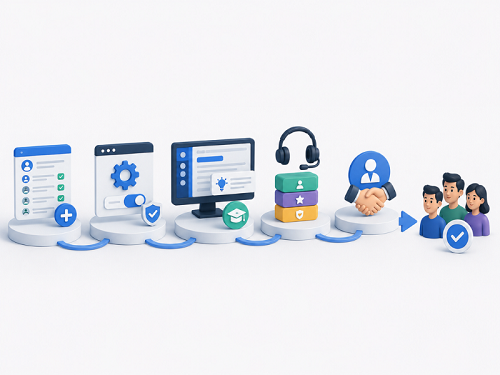
- Bulk provisioning. Admins need to add, remove, or reassign large groups of users at once – through SCIM, CSV import, or an API. Not one invite at a time.
- Admin-controlled rollout. IT often wants to pilot the product with a small group before opening it company-wide, with central control to pause or adjust access.
- In-product guidance that scales. Hundreds of new users need onboarding content that doesn’t require a live session with your team for each one.
- Defined support tiers. A named account contact and response-time commitments matter more to enterprise buyers than live chat speed.
- A dedicated customer success motion. SMB churn is a support ticket. Enterprise churn is a lost account worth more than your next ten SMB deals combined.
The teams that get this right treat onboarding as a product surface, not a services add-on. Enterprise accounts that onboard through a structured, admin-led process churn far less in year one. Accounts left to figure it out alone rarely stick around.
Where Product Teams Get This Wrong
Most enterprise readiness gaps trace back to a handful of repeat mistakes, not exotic technical problems.
- Building enterprise features as a one-off project. SSO gets added for a single deal. The next prospect needs SCIM that was never planned for. The pattern repeats every quarter instead of getting solved once.
- Treating the admin console as an afterthought. The roadmap prioritizes end-user features while the admin experience – the part IT evaluates – stays thin.
- Assuming one enterprise customer looks like the next. Every large buyer has a different identity provider and a different approval workflow. A rigid, single-path implementation breaks the moment a second enterprise logo signs.
- Skipping the compliance conversation until legal asks. Data handling and audit requirements are far cheaper to design in early than to retrofit under deal pressure – a pattern our article on why enterprise AI deployments fail in production covers from the governance side.
- Underestimating support load. One enterprise account can generate more tickets than fifty SMB accounts. A support team sized for self-serve users won’t hold up.
Signals You’re Ready to Sell Upmarket
Before investing further in enterprise sales, product and engineering leadership should answer a short set of questions honestly.
- Can an IT admin provision and deprovision users without contacting your support team? If not, that’s a bottleneck sales will hit on every deal.
- Does your product have an audit trail an auditor would accept, not just an activity feed? These aren’t the same thing, and buyers can tell the difference.
- Can you answer a security questionnaire without a multi-week scramble? If every RFP needs custom research, your product hasn’t caught up to your ambitions yet.
- Does your admin console let IT manage permissions the way it manages every other tool in its stack? A flat permission model is one of the fastest ways to lose a security review.
- Is your support model built for named accounts, not just ticket queues? Enterprise buyers expect a relationship, not a help desk.
If more than one answer is “not yet,” that’s the signal to invest in product now. Not during your next big deal.
How IMT Solutions Supports Enterprise Product Design
IMT Solutions has spent 17 years building software for BFSI, healthcare, and enterprise clients across the EU, US, and Switzerland. These are organizations that never accepted a flat permission model or an undocumented audit trail. We help product and engineering teams design the security architecture, admin tooling, and onboarding flows enterprise buyers expect. We do it without slowing the roadmap that got them there.
If you’re preparing your product for its first real enterprise deals, explore our case studies. Or contact our team to talk through where your product stands today.
Frequently Asked Questions
What does it mean to design a product for enterprise adoption?
Designing a product for enterprise adoption means building the security, administration, and onboarding capabilities large organizations require. These are the capabilities buyers need before they approve a purchase. That includes single sign-on, role-based permissions, audit logging, and centralized user provisioning. It’s a different bar than feature completeness, and it touches the data model and permission architecture, not just the UI.
What features do enterprise buyers require before signing a contract?
Enterprise buyers most commonly require single sign-on (SAML or OIDC), role-based access control, audit logs, and SCIM-based user provisioning. Larger buyers in regulated industries also ask about data residency and isolation. These features often function as a gate. Without them, a deal can stall in security review no matter how strong the core product is.
How is enterprise onboarding different from self-serve onboarding?
Enterprise onboarding involves an admin provisioning access for many users at once, often before end users ever see the product. Self-serve onboarding is one person signing up and exploring alone. Enterprise onboarding requires bulk provisioning tools and admin-controlled rollout. Support is built around a named account relationship, not a support ticket queue.
When should a SaaS company start building enterprise readiness features?
The right time is after product-market fit, once enterprise deals are a real and repeatable part of the pipeline. Not before, and not only after the first enterprise prospect asks. Building these features reactively, one deal at a time, produces inconsistent architecture that has to be rebuilt later.
What is the biggest mistake SaaS teams make when moving upmarket?
The most common mistake is treating enterprise adoption as a sales and marketing initiative rather than a product one. Sales can generate enterprise interest. But if the product lacks the security, governance, and onboarding capabilities enterprise buyers require, those deals stall in procurement, regardless of how strong the pitch is.