AI Bug Triage:
How AI Reduces
Manual Bug Prioritization
Your engineers should not spend hours sorting bugs.
Yet in many software teams, this still happens every week. Engineers and managers spend valuable time reading incoming reports, checking logs, identifying duplicates, estimating severity, deciding priority, and figuring out which team should fix the issue.
This work is necessary, but much of it is repetitive.
As products grow, bugs arrive from many sources: QA teams, monitoring tools, customer support tickets, production logs, security scanners, and internal engineering workflows. Without a clear triage process, the backlog becomes noisy. Critical issues may sit next to minor UI defects. Duplicate reports may create repeated investigation. Tickets may bounce between teams before reaching the right owner.
This is where AI bug triage becomes useful.
AI Bug Triage uses AI to enrich bug reports, predict likely severity, detect duplicate or related issues, recommend ownership, and automate routine routing. The goal is not to let AI make every decision. The goal is to reduce manual sorting work so engineers can spend more time fixing the issues that matter.
Why Manual Processes Stymie Progress and Mandate AI Bug Triage Automation
How Technical Fragmentation Stalls Defect Remediation
Layering high-speed software generation engines over manual, spreadsheet-heavy triage loops creates severe operational bottlenecks within modern release pipelines. When defect data is scattered across multiple customer desks and unindexed code repositories, engineering managers lose valuable days simply trying to classify and route work. Transitioning to an automated screening framework is an essential operational shift to clear the issue backlog and cut down software repair latency.
Manual bug triage works when bug volume is low and ownership is simple. But it becomes inefficient when products, teams, and customer channels scale.
A single defect can enter the system through several paths. QA may report it during testing. A customer may raise a support ticket. A monitoring tool may trigger an alert. A developer may notice the same issue through logs. If these signals are not connected, teams may investigate the same bug multiple times.
Manual triage also depends heavily on individual judgment. One team may classify a bug as high severity, while another may treat a similar issue as medium. One manager may prioritize customer-facing bugs first, while another may focus on technical impact. Without shared standards, the backlog becomes inconsistent.
Common signs of triage waste include:
- Engineers spend time reading incomplete reports.
- Tickets are missing logs, screenshots, or reproduction steps.
- Duplicate bugs are investigated separately.
- Issues are assigned to the wrong team.
- Critical bugs are hidden in large backlogs.
- Minor issues interrupt sprint focus.
- Support and engineering lack a shared workflow.
- Senior engineers spend too much time in triage meetings.
A bug that waits two days for correct assignment has already created a delay before engineering work begins.
Manual triage does not only slow bug management. It delays diagnosis, increases handoffs, and creates operational waste across engineering, QA, support, and product teams.

What Is AI Bug Triage?
AI Bug Triage is an AI-assisted process that analyzes incoming defect reports, enriches them with technical context, predicts likely severity, identifies duplicate or related issues, recommends ownership, and triggers routing or escalation workflows.
It does not mean:
- Letting AI close bugs without review
- Removing engineering managers from prioritization
- Treating AI predictions as final decisions
- Allowing AI to approve security or compliance risks
- Replacing root cause investigation with ticket classification
It means:
- Reducing repetitive administrative work
- Creating more consistent first-pass classification
- Giving engineers better issue context
- Routing tickets to the right team faster
- Highlighting high-risk issues earlier
- Keeping human review for important decisions
Recent developments from major infrastructure tools show what the technology handles best. For instance, modern tools like Atlassian Rovo can analyze incoming request parameters to predict urgency and route escalation triggers. Similarly, error-tracking architectures like Sentry Seer leverage historical repository context to perform automated root-cause analysis and suggest immediate code refactoring directions.
Severity and Priority in AI Bug Triage Are Not the Same
Distinguishing Algorithmic Impact Prediction from Human Context Assessment
Conflating technical impact metrics with business urgency timelines is a fundamental operational error that distorts your technology pipeline. While an intelligent model can analyze system telemetry to predict how severely an error alters your software runtime, it cannot evaluate macro business context, customer contract tier values, or strategic launch windows. Maintaining a strict architectural division between these parameters is crucial for successful software defect management.
This distinction is important for engineering managers. Severity describes how strongly a bug affects the system. It is based on technical impact.
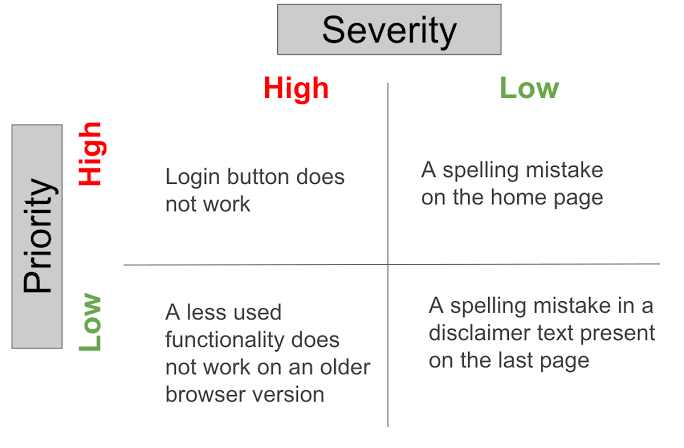
Examples of high severity include:
- Service outage
- Data loss
- Security exposure
- Broken payment flow
- Critical API failure
- Corrupted customer records
Examples of low severity may include:
- Minor UI alignment issue
- Typo in a non-critical area
- Cosmetic display problem
- Low-impact edge case with a workaround
Priority describes how soon the organization should act. It depends on business context.
Priority may be influenced by:
- Number of customers affected
- Revenue impact
- SLA obligations
- Strategic customer value
- Release deadlines
- Security exposure
- Brand risk
- Workaround availability
A spelling error on a high-traffic payment page may have low technical severity but high priority because it affects trust during a campaign. A severe backend issue may have lower immediate priority if it affects an unreleased feature with no customer impact.
AI can help predict likely severity from logs, reports, and technical signals. But priority still requires business judgment.
That is why AI Bug Triage should recommend, not decide, priority for high-impact issues.
Five Core Capabilities of AI Bug Triage
Transforming Messy Inbound Logs into Production-Ready Tickets
Deploying an intelligent AI bug triage framework allows enterprises to transform raw, unformatted system telemetry into structured, prioritized, and actionable development assignments. Rather than leaving engineers to manually piece together reproduction paths across disjointed logs, an automated stack uses machine learning to enrich, classify, cluster, and route issues the moment they appear.
A mature AI bug triage workflow usually includes five capabilities: report enrichment, severity prediction, duplicate detection, ownership recommendation, and workflow automation.
1. Bug Report Enrichment
Many bug reports start with incomplete information.
A support ticket may say “the page is broken.” A QA report may miss environment details. A monitoring alert may show an error but not the user journey. Engineers then lose time asking for logs, screenshots, versions, browser details, or reproduction steps.
AI can help enrich reports automatically by collecting and summarizing:
- Stack traces
- Error logs
- Browser and device information
- Product version
- Recent deployments
- Affected services
- Session data
- Customer ticket context
- Related historical issues
This gives engineers a more complete starting point.
Instead of receiving a vague report, the team receives a structured ticket with technical evidence, possible impact, and related context.
2. Severity Prediction
AI can analyze historical bug reports, technical signals, affected workflows, and user impact to recommend a likely severity level.
Useful inputs include:
- Error type
- Affected component
- Service availability
- Number of users affected
- Data loss or corruption signals
- Security implications
- Production impact
- Similar historical classifications
This helps high-impact issues receive attention earlier.
However, severity prediction should remain a recommendation. Human review should still be required for security defects, payment failures, privacy issues, regulated workflows, and major customer incidents.
Severity prediction should accelerate attention, not automate accountability.
3. Duplicate Detection and Root Cause Clustering
Duplicate bugs waste engineering time.
The same issue may be reported by QA, support, monitoring, and customers. If these reports are handled separately, multiple engineers may investigate the same underlying problem.
AI can compare:
- Ticket descriptions
- Stack traces
- Error messages
- Affected services
- Timestamps
- Recent deployments
- User sessions
- Historical incidents
This helps identify duplicate reports or related symptoms.
Root cause clustering goes one step further. It groups different symptoms that may come from the same underlying failure. These may look like separate bugs, but they may all come from the same authentication service issue. Clustering helps teams see the bigger pattern instead of chasing symptoms one by one.
4. Ownership Recommendation
Routing bugs to the wrong team creates unnecessary delay.
AI can recommend the most likely owner based on:
- Component ownership
- Code history
- Previous fixes
- Repository metadata
- Service boundaries
- Similar historical issues
- On-call schedules
- Current team responsibilities
This helps reduce reassignment loops.
But good routing depends on accurate ownership data. If the component map is outdated, the recommendation may also be wrong. Teams should keep service ownership, repository metadata, and escalation paths updated.
AI can route faster, but the organization must maintain clear ownership.
5. Workflow Automation and Escalation
Once a ticket is enriched, classified, and routed, workflow automation can remove manual handoffs.
The system can:
- Add labels
- Link duplicate tickets
- Suggest severity
- Add priority signals
- Assign the right team
- Notify on-call engineers
- Start SLA timers
- Escalate high-risk issues
- Create incident channels
- Update support teams
- Request human approval when needed
This is where AI bug triage becomes more than classification. It becomes part of the engineering workflow.
The best automation does not create more noise. It removes repetitive steps and helps the right people act faster.
What AI Can Handle and What Humans Must Still Review
The right model is not manual triage versus autonomous triage. It is an exception-based model. AI handles high-volume routine work. Humans handle ambiguity, high risk, and business judgment.
| Triage Area | AI Role | Human Role |
|---|---|---|
| Report summarization | Collect and summarize context | Check missing or sensitive details |
| Duplicate detection | Suggest related tickets | Confirm merge or closure |
| Severity | Recommend classification | Approve critical issues |
| Priority | Provide impact signals | Balance technical and business needs |
| Root cause clustering | Group likely related issues | Confirm technical relationship |
| Ownership | Recommend team or component | Resolve unclear ownership |
| Routing | Automate standard paths | Handle exceptions |
| Security and compliance | Flag possible risk | Own assessment and escalation |
| Final closure | Provide supporting evidence | Approve resolution |
This model keeps AI useful without giving it too much authority. AI should reduce sorting work. It should not replace accountability.
Metrics Engineering Managers Should Track
Engineering managers should not judge AI bug triage by how many tickets the system touches. A better dashboard should show whether teams receive better issues faster.
| Category | Metric | What It Shows |
|---|---|---|
| Speed | Time to first triage | How quickly new bugs are classified |
| Routing | Time to correct assignment | How fast the right team receives the issue |
| Accuracy | Severity override rate | How often humans correct AI severity |
| Routing Quality | Reassignment rate | Whether ownership recommendations are accurate |
| Efficiency | Manual triage hours reduced | How much admin work is removed |
| Backlog Health | Age of untriaged bugs | Whether the queue is under control |
| Delivery | Mean time to resolution | Whether faster triage supports faster fixes |
| Risk | Critical defects delayed | Whether high-impact issues are missed |
| Trust | Human acceptance rate | Whether teams find recommendations useful |
The goal is not more automated movement in the ticket system. The goal is less waste, faster routing, and better engineering focus.
Common Mistakes When Automating Bug Triage
Many digital transformation initiatives fail to deliver expected financial returns because engineering managers fall into predictable implementation traps:
- Automating an Inconsistent Severity Model: If your individual development units cannot agree on what a “critical” or “high” error looks like, training a machine model on those inputs will only amplify your internal confusion.
- Treating Severity and Priority as a Single Field: Conflating technical runtime errors with commercial business deadlines leads to poor allocation of capital and delayed product releases.
- Training Models on Dirty Historical Data: Relying on older corporate repositories filled with unverified labels, missing logs, and outdated team mappings results in highly inaccurate recommendations.
- Ignoring Model Confidence Scores: Attempting to force total automation onto low-confidence algorithmic predictions instead of routing those edge cases directly to human review.
- Auto-Closing Duplicate Tickets Too Early: Assuming that similar-looking error summaries always point to the exact same bug, which can accidentally mask separate platform vulnerabilities.
Why This Matters for Distributed Swiss, EU, UK, and US Teams
Distributed engineering teams face more triage friction.
They may work across different time zones, support desks, product owners, customer segments, and data access rules. A bug reported in one region may need engineering support from another. Without a consistent triage workflow, issues move slowly and ownership becomes unclear.
For companies serving Switzerland, the EU, the UK, and the US, triage also supports auditability and operational resilience.
In trust-heavy sectors such as finance, insurance, healthcare, telecom, enterprise SaaS, and public-sector-related systems, teams should be able to show:
- What data informed a recommendation
- Which action was automated
- Who approved a critical decision
- Why severity or ownership changed
- When an issue was escalated
- Why a ticket was closed or merged
This does not mean every bug needs a compliance review. It means the workflow should be traceable when the issue matters.
NIST AI Risk Management Framework can be a useful reference for teams thinking about AI governance and risk management in production systems. The point is not to overcomplicate bug triage. The point is to ensure AI-assisted workflows remain explainable, reviewable, and safe for business-critical environments.
How IMT Solutions Can Support Bug Triage Automation
AI Bug Triage is not only an AI model. It requires integration across issue tracking, observability, QA, support, repositories, and CI/CD workflows.
If your software developers are losing valuable focus time sorting through messy logs, or your issue backlogs are acting as a delivery bottleneck, it is time to upgrade your framework. An independent engineering review can help your leadership team clarify severity definitions, isolate duplicate entries, optimize routing pipelines, and integrate real-time observability data before you scale automation. Explore our latest integration approaches in Blogs – IMT Solutions, analyze our live delivery history in Case Studies – IMT Solutions, or connect with our platform specialists at Contact IMT Solutions to advance your software lifecycle with absolute confidence.
Final Thoughts: Automate the Sorting, Not the Accountability
Bug triage is necessary, but engineers should not spend hours performing repetitive sorting work.
AI Bug Triage can enrich reports, predict severity, detect duplicates, group related failures, recommend ownership, and trigger standard workflows. This gives engineering teams faster access to better information and helps critical issues reach the right people sooner.
But AI should not make every decision.
Human judgment remains essential for business priority, security, customer impact, and final accountability. The right goal is not a bug queue without humans. It is a bug workflow where humans only step in when their context and judgment add real value.
Automate the sorting. Keep accountability with the team.
FAQ
What is AI Bug Triage?
AI Bug Triage is an AI-assisted process that analyzes incoming defect reports, enriches them with technical context, predicts likely severity, identifies duplicate or related issues, recommends ownership, and automates routing or escalation.
What is the difference between bug severity and priority?
Severity describes how strongly a bug affects the system. Priority describes how soon the organization should act based on business impact, urgency, customer needs, deadlines, and available workarounds.
Can AI predict bug severity?
AI can recommend likely severity based on historical reports, technical signals, affected workflows, and user impact. Human review should remain mandatory for critical, security-sensitive, or regulated issues.
How does AI detect duplicate bugs?
AI can compare descriptions, error messages, stack traces, affected services, timestamps, deployment history, and historical issues to find reports that may describe the same defect.
What is root cause clustering?
Root cause clustering groups different errors or symptoms that may come from the same underlying system failure. This helps teams avoid investigating each symptom separately.
Does AI Bug Triage replace engineering managers?
No. It removes repetitive classification and routing work. Engineering managers still own priority decisions, risk, exceptions, and accountability.
What metrics should engineering managers track?
Useful metrics include time to first triage, time to correct assignment, severity override rate, reassignment rate, duplicate detection quality, manual triage hours reduced, backlog age, and mean time to resolution.